History: MultiLangVsNetCodeAnalysisCodeFix
Preview of version: 12
Multi-Language for Visual Studio
Code Analysis and Code Fix
Starting with Version 7.2, Multi-Language for Visual Studio contains a code analysis and several associated code fixes.
What is a code analysis?
A code analysis is a rule that is applied in the background. If the rule is violated, then the code which violates the rule is underlined with a wavy green line.
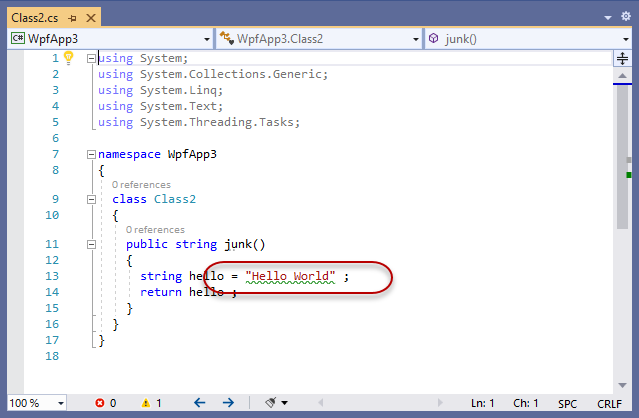
There is some general information about code analyzers on this page.
What is a code fix?
A code fix is a change that can be made to your code, so that the rule is satisfied. There may be one or more code fixes for any rule.
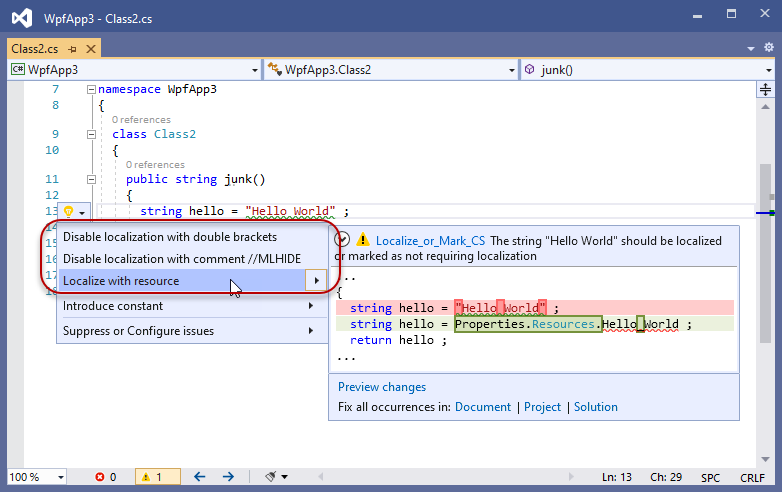
The code fixes appear in the menu below the light bulb icon. This appears in the left hand margin, or next to the code, if you hold the mouse pointer over the code with the wavy green line.
When is the Multi-Language code analysis active?
The code analysis is active on any project which is already using Multi-Language.
Multi-Language adds a project database file (usually ProjectName_ml.xml) to the project, so the code analysis should be active if this file is present in your project.
In addition, the code analysis can be enabled and disabled in the project settings dialog, as shown below. By default, the code analysis is enabled.
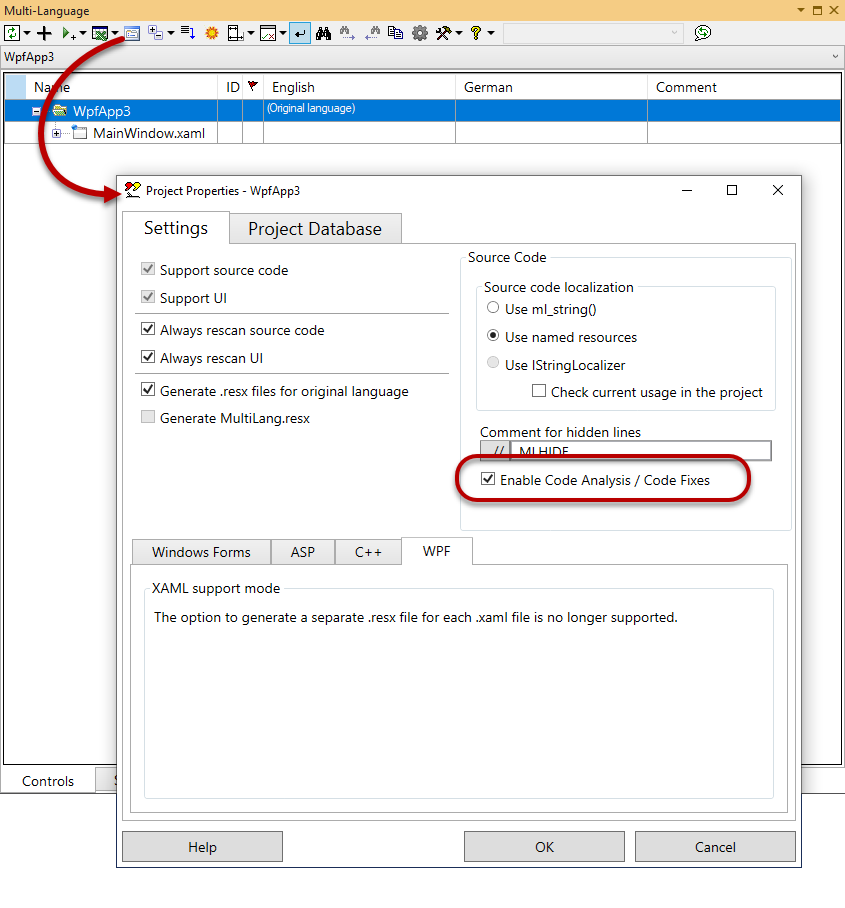
It is not necessary to scan the project using the the Multi-Language tool window.
What rule does the Multi-Language code analysis apply?
The rule applied by the Multi-Language code analysis is that every string in your source code should be either:
- localized
or - marked as not requiring localization (hidden)
It is important to apply this rule during coding for two reasons.
It's the programmer's job
Your source code probably contains some strings which require localization and some which don't. If you simply translate all strings to another language, you will most likely break the functionality of the program.
You cannot expect a localization professional to know which strings require localization and which ones do not. This is a job for the original programmer.
You only want to do it once
Localization is not a one-off activity. After localizing version 1 of your program, you are probably going to want to localize version 2 of the program, which will probably contain some new strings.
If - in version 1 - you have marked the strings which do not require localization, then it will be fairly easy to find any new strings added in version 2.
If you did not mark the strings which do not require localization, then you will probably end up looking at every one of them again, to decide whether or not it requires localization.
What does the Multi-Language Code-Analysis check in detail?
The code analysis checks the strings and interpolated strings in the source code files (C# and VB).
For each string, it checks whether it is "hidden" ...
Strings containing no letters
Strings which do not contain any letters are ignored.
For example ".", "100" or " ".
Strings in ignored modules
Attribute parameters
In the current version (7.02.0004) attribute parameters are ignored, because a necessary code fix has not yet been implemented.
This will be changed in a future version.
Parameters to ...
Parameters to certain special functions are ignored, in particular:
- ml.ml_string() (C#)
- ml_string() (VB)
- ml.GetString()
- Debug.WriteLine()
This list may be expanded in future.
Strings in a hidden block
You can define a hidden block using the comments MLHIDEON and MLHIDEOFF, for example
//MLHIDEON
private string templatefile = "template.cs" ;
private string logfile      = "logfile.txt" ;
private string helpfile     = "helpfile.chm" ;
//MLHIDEOFF
Any string in a hidden block is ignored.
Strings in double brackets
This is a special syntax used by Multi-Language to hide a single string, for example:
public string junk()
{
  string hello = (("Hello World")) ;
  return hello ;
}
Strings in double brackets are ignored.
Lines with the MLHIDE comment
The usual way to hide a string using Multi-Language is to add the comment MLHIDE to the end of the line, for example:
public string junk()
{
  string hello = "Hello World" ;    //MLHIDE
  return hello ;
}
Any string on a line with this comment is ignored.
Blocked functions
All strings in certain blocked functions are ignored, in particular:
- InitializeComponent
- ml_UpdateControls
This list may be expanded in future.
Actually, it only really makes sense to ignore the function InitializeComponent in WinForms projects (and not WPF) so this might also be changed.
Strings localized using IStringLocalizer
ASP.NET Core supports a method of localization using a "localizer" object with the interface IStringLocalizer. This uses the original text string as resource-key to for the localized text.
The parameter to the localizer object is ignored..
Any string which is not ignored for one of the reasons listed above violates the rule.
What code fixes are available?
There are generally three possible code fixes:
- hide the string in double brackets
- hide the string using the comment MLHIDE
- localize the string
In each case, a preview window shows the exact code change, before it is made.
Disable localization with double brackets
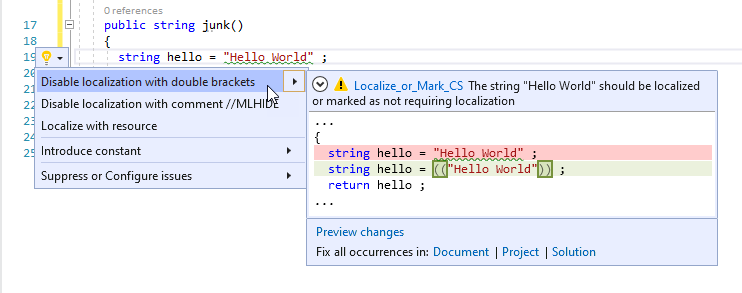
This has already been described in the table above.
If there is only one string on the line, I generally prefer to use the MLHIDE comment instead of this method, because the syntax is a bit odd.
If there are multiple strings on a single line, this method has the advantage of of applying only to one string, and not to the whole line.
Disable localization with the comment MLHIDE

This has already been described in the table above.
If there are multiple strings on the line, this method has the disadvantage of hiding them all (but it has the advantage of simplicity).
Localize with a resource
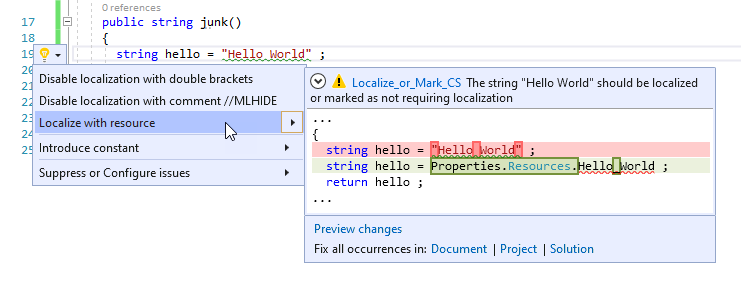
This option is available if you have chosen to localize texts using so called "Named Resources".
Localize with the function ml_string()

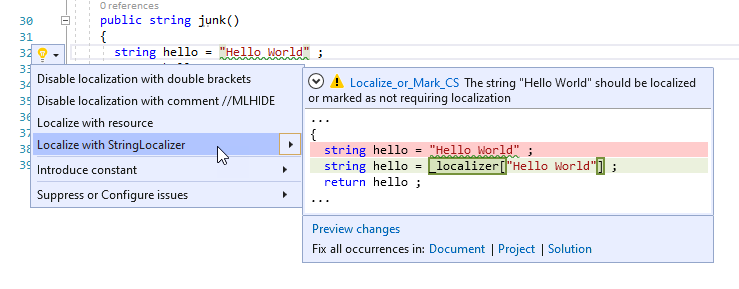
Localize with the IStringLocalizer method